The unlocked laptop
Someone leaves their laptop open? Start the prank and wait. The next nudge of the trackpad shatters the screen.
Windows · Mac · Chromebook
Turn an unlocked laptop or monitor into a cracked, bleeding LCD. Set it to break when the mouse moves, walk away, and let the next person to touch it find out.
F start prank N new crack D download Esc or long-press to exit
Made for computers
Someone leaves their laptop open? Start the prank and wait. The next nudge of the trackpad shatters the screen.
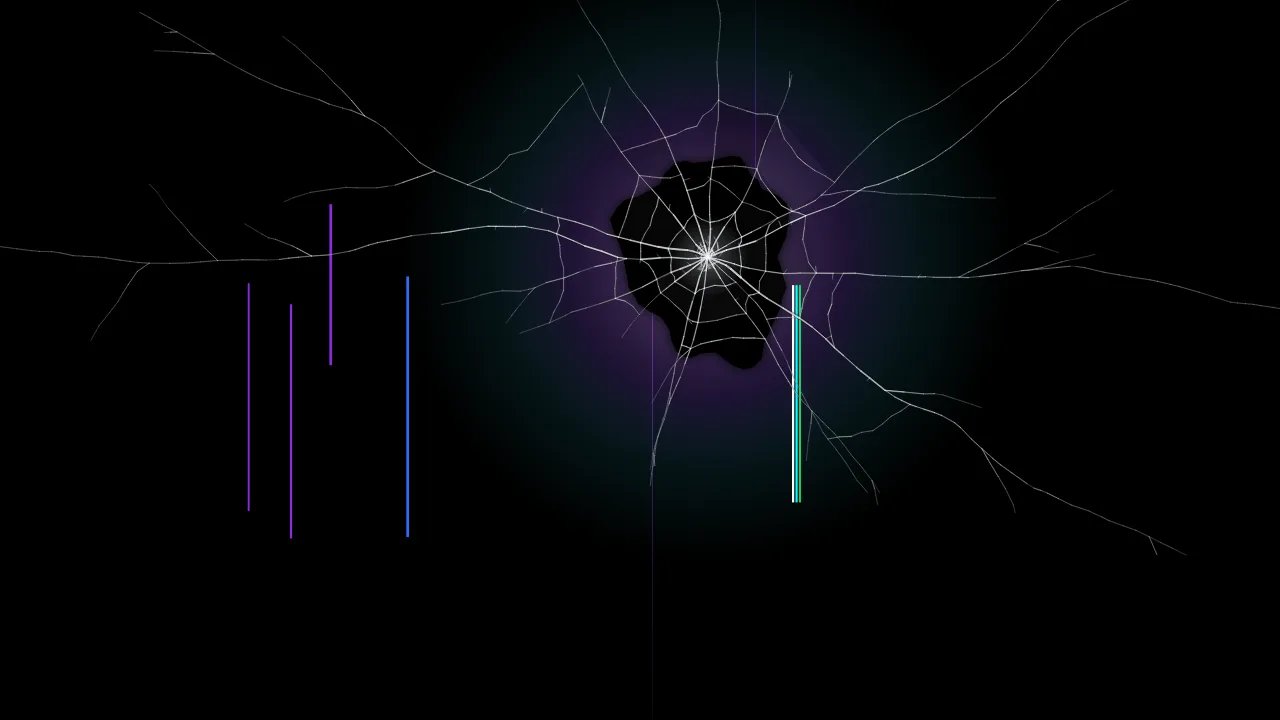
LCD bleed adds a black ink leak and dead pixel lines, exactly how a knocked laptop panel fails.
Upload a screenshot of their desktop so the cracks sit over the windows and wallpaper they left open.
Cracks are drawn at the monitor’s native resolution, so they stay crisp on 4K, 5K and ultrawide displays.
How it works
Laptop prank guide
A cracked laptop screen rarely looks like a smashed phone. Laptop panels are thinner and less protected, so a knock often damages the LCD itself: a black or purple ink blot spreads from the impact, thin coloured lines run from top to bottom, and parts of the picture flicker or die. The LCD bleed style recreates exactly that — cracked glass, a black ink leak with a purple halo, dead pixel lines and an occasional flicker — while Destroyed adds dead bands and more impacts for a laptop that has had a really bad day.
The prank is most convincing when the cracks sit on top of the screen the victim left behind. Take a screenshot, then choose My screenshot and select it:
The screenshot stays on the computer. It is drawn behind the cracks in the browser and remembered locally so the prank still works if the page reloads.
Set When should it break? to When the mouse moves or a key is pressed and press Start the prank. You get a few seconds to take your hand off the mouse. After that the screen looks untouched until someone moves the mouse, taps the trackpad or presses a key, and then the glass shatters with sound. Every key they press afterwards adds another crack, which tends to make things worse in a very satisfying way.
Prefer a delay? Choose a timer from 5 seconds to 5 minutes. It is ideal for a laptop left on a meeting room table.
Most fake broken screen sites stretch a 1080p image over whatever screen you have, which looks blurry on a modern laptop and terrible on a 4K monitor. Here the cracks are generated for your display at its native resolution — a 14-inch MacBook Pro at 3024 × 1964, an ultrawide at 3440 × 1440 or an 8K panel at 7680 × 4320 — so every crack stays thin and sharp up close.
Browsers can only make one window full screen at a time. For a multi-monitor desk, open this page in a second window, drag it to the other display and start the prank there too. Choose different crack styles on each screen for a desk that looks like it fell off a truck.
A cracked work laptop can cause real panic, and IT teams do not always share the joke. Keep it light: only prank people you know well, reveal it fast, and never use a fake broken screen to get out of work, a deadline or an exam. If you want a fake broken phone instead, try the broken phone screen prank, or grab a crack as a desktop wallpaper in 4K or 8K.
Helpful answers
Open this page, choose a crack such as LCD bleed or Shattered and press Start the prank (or the F key). The browser goes full screen and shows realistic cracked glass over a black screen, a lock screen or a screenshot of your desktop. Press Esc to go back to normal.
Yes. Set When should it break to When the mouse moves or a key is pressed. After a short pause to let you take your hand off the mouse, the next movement, click or key press shatters the screen with sound.
Press Esc. On a Mac, Esc or Cmd + Ctrl + F also leaves full screen; on Windows and ChromeOS, Esc or F11. You can also press and hold the mouse button for a second to show an Exit prank button.
Yes. It runs in Chrome, Edge, Safari, Firefox, Opera and Brave on Windows, macOS, ChromeOS and Linux, with no download or extension.
Yes. Drag a browser window to the other monitor before you press Start the prank, and it fills that screen. Smart TVs and streaming sticks with a web browser can open it too, and the cracks are drawn at up to 8K.
No. It is a web page that draws an image. It cannot read files, change settings or affect the hardware, and closing the tab removes it completely.